

Changelog Sep 29, 2026 - Split and earnings scans, and API docs for agents
Scan for stocks that split or report earnings in the last or next N days, candlestick scans now filter on Bullish or Bearish, and the API docs gain sixteen guides and a prompt that connects your AI agent.
 Eoin4 min read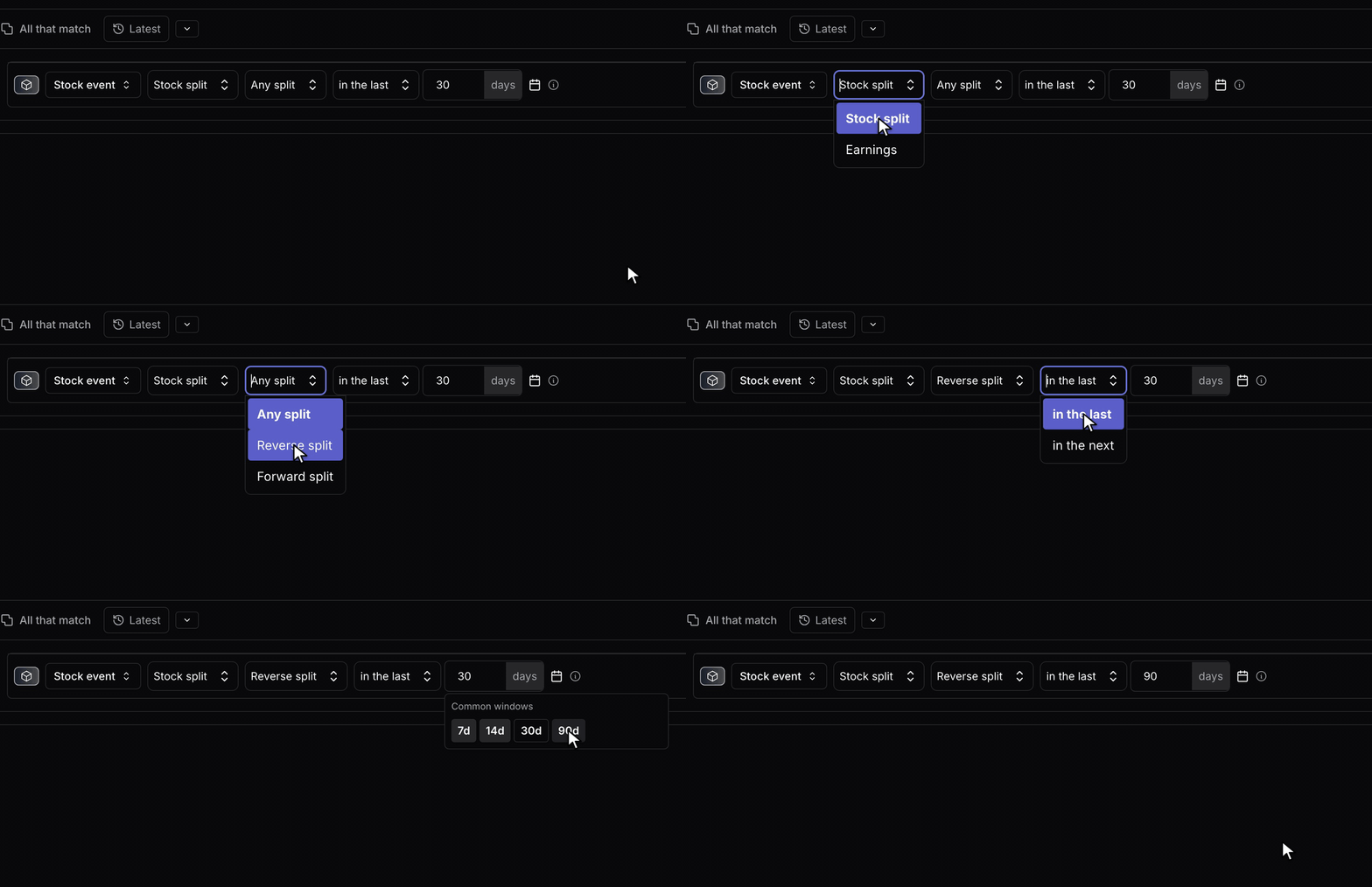
You can now scan for stocks that split or report earnings within a window of days around today. This release also fixes scans that lost some of their filters on the way to our scan engine, candlestick direction among them, and rebuilds the API docs so an AI agent can connect itself to Scanr.
Scan for splits and earnings in the last or next N days
In the scan builder, add a Stock event row from the filter picker. Choose the event, Stock split or Earnings, and a window: in the last N days or in the next N days, from 1 to 366. The Common windows menu offers 7, 14, 30 and 90. For splits you can keep only reverse splits (fewer shares, such as 1-for-10) or forward splits. Stock dividends never count as splits.
Splits match on their ex-date. Earnings match on the day the company reports, which is not the end of its fiscal quarter.
We count calendar days from today in New York, so a saved "last 30 days" scan covers the last 30 days whenever you run it, and its results roll at midnight ET. A time-machine scan can only look back, since nobody can know which events were on the calendar at a past date.
The filter is Experimental and works on every plan, including free. You add it on the web; the iPhone and Android app can't edit one yet, and the earnings kind has no timing or EPS settings so far.
Scans keep every filter you set
Our server checked each scan against a list of fields that had fallen behind our scan engine, and dropped whatever it didn't know without a warning. A Bullish Engulfing scan returned bearish engulfings too. Market Strength and Market Efficiency rows, the Divide and PctRank modifiers, and Beneish M-Score and Piotroski F-Score filters never applied, and switching off an insider row left it running. Bollinger Bands and other studies with a moving-average type returned an error instead of a scan.
Saved scans and presets that use these filters, the Bullish Engulfing preset included, now run as you wrote them. Expect fewer matches, sometimes far fewer. We didn't touch your saved scans, which had stored these settings all along. Results from earlier runs came from the wider, unfiltered version.
API docs written for agents
api-docs.scanr.ai has nineteen guides, up from
three, running from a Quick Start to six worked use cases. Every page has a
Markdown copy, served beside llms.txt and an Agent Skill.
To connect an agent, click Copy onboarding prompt on the docs home or the MCP Server page and paste it into your AI client. The prompt walks the agent through MCP or REST setup, your API token and a first scan.
API and MCP fixes
- MCP clients found no tools when they connected. They list them all now, and MCP scans respect your personal data-access setting, as REST did.
- A token kept working after its API plan ended. It now gets a 403 until you renew, then works again.
- Tokens hit a server error on 15 saved-scan and scan-performance endpoints. They answer tokens now.
- Responses carry
RateLimit-Limit,RateLimit-Remaining,RateLimit-ResetandRateLimit-Policy, and a 429 addsRetry-After. Each window resets on schedule from its first request, and a limit of 100 admits 100 requests, where it used to admit 99. - Power User tokens received realistic placeholder numbers in the regime fields
of the relative-strength and stock-indicators endpoints. Discard any you
stored. Plans below Business now get
nullthere, and a newwithheld_fieldslist names those fields. - Every error returns the documented
{error: {statusCode, message}}JSON,?include_otc=falseno longer reads as true, and JSON date fields accept ISO timestamps. - The scan results-attachments and metrics-ranks endpoints only take scan IDs from your own account.
Also in this release
- API pricing shares its layout with the main pricing page, minus two claims the API never enforced: Starter data isn't delayed 15 minutes, and no plan caps how much history you read.
- The Trend column on the Theme Overview card stops stretching small moves to fill the cell. A renamed theme reads New until it has three closed sessions under its new name. Web and app.
- The theme details dialog tucks its as-of note behind an info icon, so each theme's description sits at the top.
Tell us what your event scans turn up at feedback.scanr.ai or [email protected].
— Eoin & The Scanr.ai team